KH5600_W
4K60 HDMI™ over IP Extender with USB 2.0, up to 100 m over CAT5e/6
4K60 HDMI™ over IP Extension and Distribution
KH5600_W adopts standard JPEG2000 encoding and decoding technology. Through a standard 1G network switch, it can distribute one UHD HDMI signal to a single UHD display or to multiple UHD display devices. The Encoder captures and encodes the HDMI source signal, then transmits it over a CAT5e/6 network cable. The Decoder receives, decodes, and outputs the HDMI signal to the display.
With a CAT5e/6 cable between the Encoder and Decoder, the transmission distance can reach up to 100 m / 328 ft. The unit supports up to 4K@60Hz 4:4:4 resolution, USB 2.0 transmission, and bi-directional IR control, making it suitable for meeting rooms, classrooms, control rooms, digital signage, and multi-display distribution applications.
Use a straight-through network cable connection. Do not use a crossover cable. If the installation includes other network devices or multiple device groups, configure Jumbo Frame and VLAN planning according to the switch configuration requirements.
AV and Control Features
- Transmission Architecture
- Supports point-to-point extension and one-to-many distribution through a standard 1G network switch.
- HDCP
- Compliant with HDCP 2.3 / 2.2 / 1.x.
- Video Bandwidth
- Up to 18Gbps.
- Maximum Resolution
- Supports up to 4K2K@50/60Hz 4:4:4, compliant with HDMI™ 2.0b.
- HDR
- Supports HDR10, HDR10+, Dolby Vision, and HLG pass-through.
- Audio Formats
- Supports LPCM 7.1CH, Dolby 5.1, Dolby TrueHD, Dolby Atmos, DTS-HD Master, and DTS:X Audio.
- USB
- Supports USB 2.0 transmission with 480Mbps bandwidth.
- Control
- Supports bi-directional IR transmission and API command transmission through the SERVICE port.
- Audio De-embedding
- The Decoder supports analog audio de-embedding output.
- Installation Design
- Compact metal enclosure for easy mounting and integration behind equipment or inside AV racks.
Encoder + Decoder Kit
| Item | Quantity |
|---|---|
| 4K60 HDMI™ over IP CAT Extender (Encoder) | 1 |
| 4K60 HDMI™ over IP CAT Extender (Decoder) | 1 |
| IR Blaster Cable, 1.5 m | 1 |
| IR Wideband Receiver Cable, 1.5 m | 1 |
| USB Cable (USB Type-A to Type-B), 1.5 m | 1 |
| 12V / 1A Locking Power Supply | 2 |
| Mounting Ear | 4 |
| Machine Screw | 8 |
| User Manual | 1 |
Single-unit Package Options
Includes Encoder, IR cables, USB cable, 12V/1A power supply, mounting ears, screws, and user manual.
Includes Decoder, IR cables, 12V/1A power supply, mounting ears, screws, and user manual.
Video, Network, and Audio
- HDMI™ Compliance
- HDMI™ 2.0b
- HDCP Compliance
- HDCP 2.3 / 2.2 / 1.x
- Video Bandwidth
- 18Gbps
- USB Bandwidth
- 480Mbps
- Network Bandwidth
- 1000Mbps
- Resolution
- Supports 480i/576i, 720p, 1080i/p, 4K2K 24/25/30, 4K2K50/60 4:2:0, 4K2K50/60 4:4:4, and multiple PC resolutions up to 1920×1200@60RB.
- Color Space
- RGB 4:4:4, YCbCr 4:4:4, YCbCr 4:2:2, YCbCr 4:2:0.
- Color Depth
- 8 / 10 / 12-bit; 4K60Hz 4:4:4 supports 8-bit.
- Audio Formats
- HDMI audio supports LPCM 7.1CH, Dolby 5.1, Dolby TrueHD, Dolby Atmos, DTS-HD Master, and DTS:X; analog audio supports PCM 2.0.
Mechanical and Environmental
- Transmission Distance
- Up to 100 m / 328 ft over CAT5e/6 cable.
- ESD Protection
- IEC 61000-4-2: ±8kV air-gap discharge and ±4kV contact discharge.
- Dimensions
- Encoder / Decoder: 142 mm (W) × 125.5 mm (D) × 26.5 mm (H).
- Weight
- Encoder: approx. 515 g; Decoder: approx. 512 g.
- Power Supply
- Input: AC 100–240V 50/60Hz; Output: DC 12V / 1A.
- Power Consumption
- Encoder: approx. 5.59W; Decoder: approx. 17.58W.
- Operating Temperature
- 0°C ~ 40°C / 32°F ~ 104°F。
- Storage Temperature
- -20°C ~ 60°C / -4°F ~ 140°F。
Encoder Front and Rear Panel Functions
- PWR LED
- The red LED lights up when the Encoder is powered on.
- LINK LED
- On: Encoder and Decoder are connected properly. Off: not connected or connection is abnormal. Flashing: the unit is upgrading.
- IN LED
- On: HDMI IN is connected to a source device. Off: HDMI IN is not connected or is not working properly.
- SERVICE
- Used for MCU update and API command transmission.
- LAN
- Connects to the Decoder LAN port, or to a switch/router/hub for AV data transmission over CAT cable.
- HDMI IN
- HDMI signal input for connecting an HDMI source device.
- USB HOST
- USB-B host port for connecting to a computer.
- IR IN / IR OUT
- IR IN connects to the IR receiver cable and sends the signal to the Decoder IR OUT. IR OUT connects to the IR blaster cable and receives the signal from the Decoder IR IN.
- DC 12V
- DC 12V / 1A power input.
Decoder Front and Rear Panel Functions
- PWR LED
- The red LED lights up when the Decoder is powered on.
- LINK LED
- On: Encoder and Decoder are connected properly. Off: not connected or connection is abnormal. Flashing: the unit is upgrading.
- OUT LED
- On: HDMI OUT is connected to a display device. Off: HDMI OUT is not connected or is not working properly.
- USB LED
- Lights up in point-to-point mode. In one-to-many mode, the Decoder selected for USB 2.0 transmission will light up.
- USB Button
- In one-to-many mode, short press to select the USB 2.0 devices on this Decoder for transmission back to the USB Host. Press again to display Baud Rate, MAC Address, and IP Address sequentially on the display. Long press for 3 seconds to transmit this Decoder’s EDID to the Encoder.
- USB 2.0 DEVICE
- Four USB 2.0 device ports. Each port is limited to 1A, and each dual-layer USB port pair is limited to 1A in total.
- LAN
- Connects to the Encoder LAN port, or receives Encoder signals through a network switch.
- HDMI OUT
- HDMI signal output for connecting a TV, monitor, or projector.
- AUDIO OUT
- Analog audio output, supporting up to 2Vrms and PCM 2.0, for connection to speakers or audio devices.
- IR IN / IR OUT
- IR IN connects to the IR receiver cable and sends the signal to the Encoder IR OUT. IR OUT connects to the IR blaster cable and receives the signal from the Encoder IR IN.
- DC 12V
- DC 12V / 1A power input.
Serial Communication Parameters
- Connection Method
- Connect the product SERVICE port to a computer and use a serial command tool to send ASCII commands.
- Baud Rate
- 115200 (default)
- Data Bits
- 8
- Stop Bits
- 1
- Check Bit
- 0 / None
Common ASCII Commands
| Function | Command | Info |
|---|---|---|
| Get All Commands | ? | Lists all API commands. |
| Help | help | Lists all API commands. |
| Current Status | status | Gets the current device status. |
| Reboot | reboot | Reboots the device and initializes the system. |
| Factory Reset | reset | Resets system settings to default; enter "yes" when prompted to confirm. |
| Firmware Version | get version | Gets BOOT, MCU, and IP version information. |
| Set Stream Type | set stream type 0 | x = 0–1; sets unicast or broadcast mode. |
| Get Stream Type | get stream type | Queries the current stream type. |
| Set Link Channel | set link ch 1 | x = 1–16; specifies the Link Channel. |
| Get Link Channel | get link ch | Queries the current Link Channel. |
Before using advanced network commands such as MAC address settings, verify the site network plan to avoid address conflicts with existing devices.
Point-to-Point Direct Connection
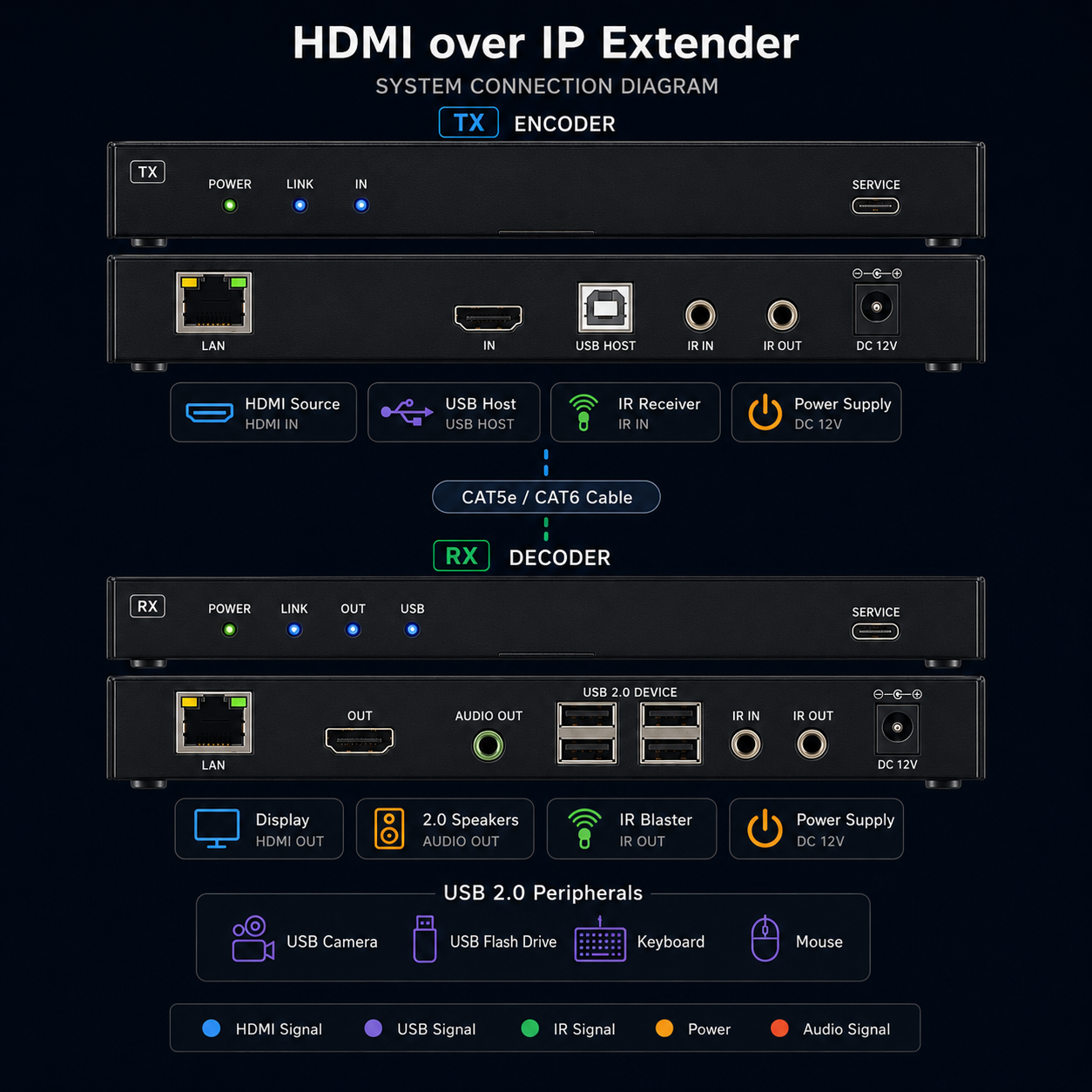
The Encoder connects directly to the Decoder via CAT5e/6 cable, extending HDMI video, USB devices, IR control, and audio output simultaneously. This mode is ideal for one source to one display or a single workstation.
One-to-Many Distribution via Network Switch
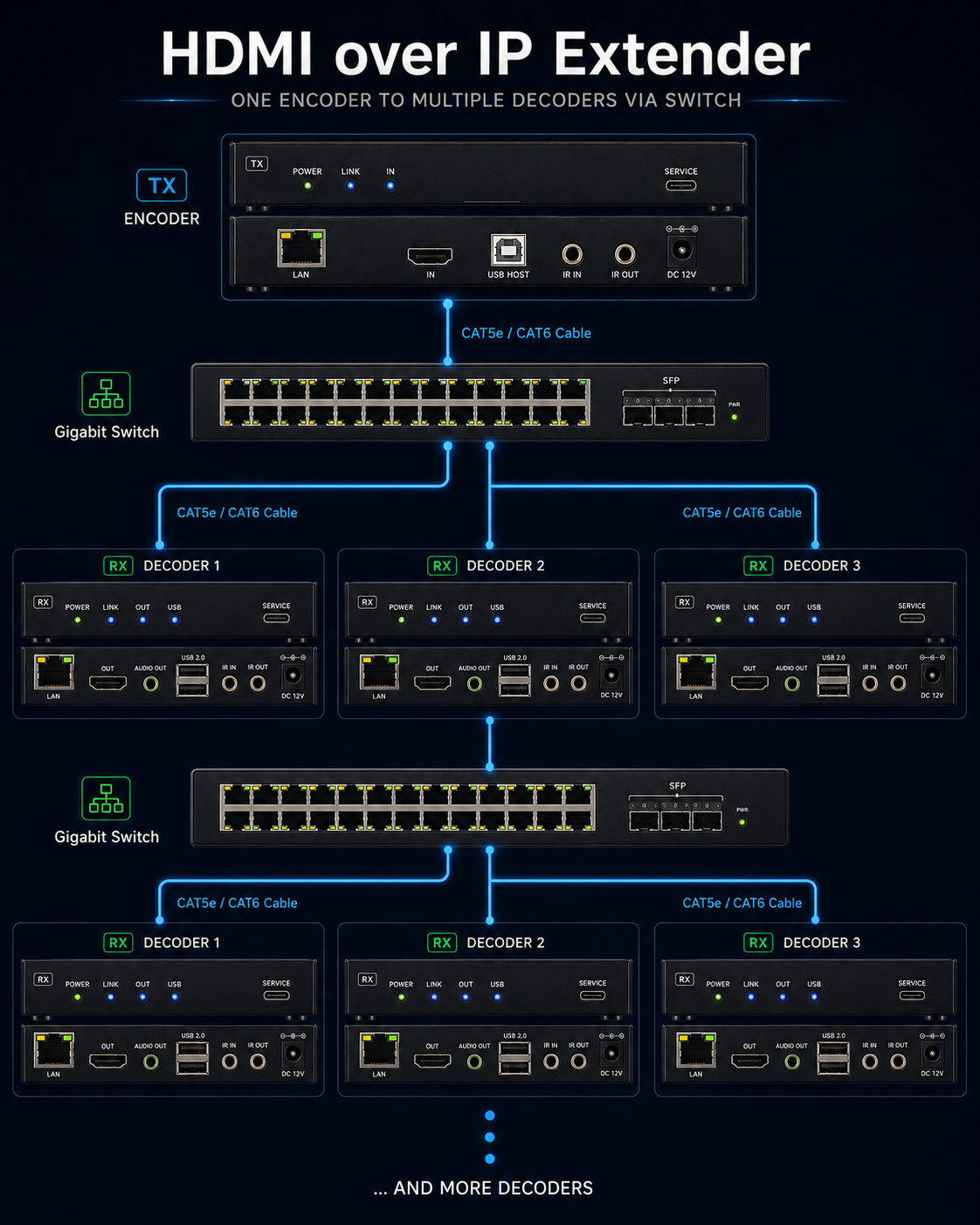
One Encoder can connect to multiple Decoders through a 1G network switch, distributing the same HDMI source signal to multiple displays. In this mode, the switch may require Jumbo Frame or VLAN configuration; complete the network planning according to the switch configuration requirements before deployment.
KH5600_W
4K60 HDMI™ over IP Extender with USB 2.0, up to 100 m over CAT5e/6
4K60 HDMI™ over IP Extension and Distribution
KH5600_W adopts standard JPEG2000 encoding and decoding technology. Through a standard 1G network switch, it can distribute one UHD HDMI signal to a single UHD display or to multiple UHD display devices. The Encoder captures and encodes the HDMI source signal, then transmits it over a CAT5e/6 network cable. The Decoder receives, decodes, and outputs the HDMI signal to the display.
With a CAT5e/6 cable between the Encoder and Decoder, the transmission distance can reach up to 100 m / 328 ft. The unit supports up to 4K@60Hz 4:4:4 resolution, USB 2.0 transmission, and bi-directional IR control, making it suitable for meeting rooms, classrooms, control rooms, digital signage, and multi-display distribution applications.
Use a straight-through network cable connection. Do not use a crossover cable. If the installation includes other network devices or multiple device groups, configure Jumbo Frame and VLAN planning according to the switch configuration requirements.
AV and Control Features
- Transmission Architecture
- Supports point-to-point extension and one-to-many distribution through a standard 1G network switch.
- HDCP
- Compliant with HDCP 2.3 / 2.2 / 1.x.
- Video Bandwidth
- Up to 18Gbps.
- Maximum Resolution
- Supports up to 4K2K@50/60Hz 4:4:4, compliant with HDMI™ 2.0b.
- HDR
- Supports HDR10, HDR10+, Dolby Vision, and HLG pass-through.
- Audio Formats
- Supports LPCM 7.1CH, Dolby 5.1, Dolby TrueHD, Dolby Atmos, DTS-HD Master, and DTS:X Audio.
- USB
- Supports USB 2.0 transmission with 480Mbps bandwidth.
- Control
- Supports bi-directional IR transmission and API command transmission through the SERVICE port.
- Audio De-embedding
- The Decoder supports analog audio de-embedding output.
- Installation Design
- Compact metal enclosure for easy mounting and integration behind equipment or inside AV racks.
Encoder + Decoder Kit
| Item | Quantity |
|---|---|
| 4K60 HDMI™ over IP CAT Extender (Encoder) | 1 |
| 4K60 HDMI™ over IP CAT Extender (Decoder) | 1 |
| IR Blaster Cable, 1.5 m | 1 |
| IR Wideband Receiver Cable, 1.5 m | 1 |
| USB Cable (USB Type-A to Type-B), 1.5 m | 1 |
| 12V / 1A Locking Power Supply | 2 |
| Mounting Ear | 4 |
| Machine Screw | 8 |
| User Manual | 1 |
Single-unit Package Options
Includes Encoder, IR cables, USB cable, 12V/1A power supply, mounting ears, screws, and user manual.
Includes Decoder, IR cables, 12V/1A power supply, mounting ears, screws, and user manual.
Video, Network, and Audio
- HDMI™ Compliance
- HDMI™ 2.0b
- HDCP Compliance
- HDCP 2.3 / 2.2 / 1.x
- Video Bandwidth
- 18Gbps
- USB Bandwidth
- 480Mbps
- Network Bandwidth
- 1000Mbps
- Resolution
- Supports 480i/576i, 720p, 1080i/p, 4K2K 24/25/30, 4K2K50/60 4:2:0, 4K2K50/60 4:4:4, and multiple PC resolutions up to 1920×1200@60RB.
- Color Space
- RGB 4:4:4, YCbCr 4:4:4, YCbCr 4:2:2, YCbCr 4:2:0.
- Color Depth
- 8 / 10 / 12-bit; 4K60Hz 4:4:4 supports 8-bit.
- Audio Formats
- HDMI audio supports LPCM 7.1CH, Dolby 5.1, Dolby TrueHD, Dolby Atmos, DTS-HD Master, and DTS:X; analog audio supports PCM 2.0.
Mechanical and Environmental
- Transmission Distance
- Up to 100 m / 328 ft over CAT5e/6 cable.
- ESD Protection
- IEC 61000-4-2: ±8kV air-gap discharge and ±4kV contact discharge.
- Dimensions
- Encoder / Decoder: 142 mm (W) × 125.5 mm (D) × 26.5 mm (H).
- Weight
- Encoder: approx. 515 g; Decoder: approx. 512 g.
- Power Supply
- Input: AC 100–240V 50/60Hz; Output: DC 12V / 1A.
- Power Consumption
- Encoder: approx. 5.59W; Decoder: approx. 17.58W.
- Operating Temperature
- 0°C ~ 40°C / 32°F ~ 104°F。
- Storage Temperature
- -20°C ~ 60°C / -4°F ~ 140°F。
Encoder Front and Rear Panel Functions
- PWR LED
- The red LED lights up when the Encoder is powered on.
- LINK LED
- On: Encoder and Decoder are connected properly. Off: not connected or connection is abnormal. Flashing: the unit is upgrading.
- IN LED
- On: HDMI IN is connected to a source device. Off: HDMI IN is not connected or is not working properly.
- SERVICE
- Used for MCU update and API command transmission.
- LAN
- Connects to the Decoder LAN port, or to a switch/router/hub for AV data transmission over CAT cable.
- HDMI IN
- HDMI signal input for connecting an HDMI source device.
- USB HOST
- USB-B host port for connecting to a computer.
- IR IN / IR OUT
- IR IN connects to the IR receiver cable and sends the signal to the Decoder IR OUT. IR OUT connects to the IR blaster cable and receives the signal from the Decoder IR IN.
- DC 12V
- DC 12V / 1A power input.
Decoder Front and Rear Panel Functions
- PWR LED
- The red LED lights up when the Decoder is powered on.
- LINK LED
- On: Encoder and Decoder are connected properly. Off: not connected or connection is abnormal. Flashing: the unit is upgrading.
- OUT LED
- On: HDMI OUT is connected to a display device. Off: HDMI OUT is not connected or is not working properly.
- USB LED
- Lights up in point-to-point mode. In one-to-many mode, the Decoder selected for USB 2.0 transmission will light up.
- USB Button
- In one-to-many mode, short press to select the USB 2.0 devices on this Decoder for transmission back to the USB Host. Press again to display Baud Rate, MAC Address, and IP Address sequentially on the display. Long press for 3 seconds to transmit this Decoder’s EDID to the Encoder.
- USB 2.0 DEVICE
- Four USB 2.0 device ports. Each port is limited to 1A, and each dual-layer USB port pair is limited to 1A in total.
- LAN
- Connects to the Encoder LAN port, or receives Encoder signals through a network switch.
- HDMI OUT
- HDMI signal output for connecting a TV, monitor, or projector.
- AUDIO OUT
- Analog audio output, supporting up to 2Vrms and PCM 2.0, for connection to speakers or audio devices.
- IR IN / IR OUT
- IR IN connects to the IR receiver cable and sends the signal to the Encoder IR OUT. IR OUT connects to the IR blaster cable and receives the signal from the Encoder IR IN.
- DC 12V
- DC 12V / 1A power input.
Serial Communication Parameters
- Connection Method
- Connect the product SERVICE port to a computer and use a serial command tool to send ASCII commands.
- Baud Rate
- 115200 (default)
- Data Bits
- 8
- Stop Bits
- 1
- Check Bit
- 0 / None
Common ASCII Commands
| Function | Command | Info |
|---|---|---|
| Get All Commands | ? | Lists all API commands. |
| Help | help | Lists all API commands. |
| Current Status | status | Gets the current device status. |
| Reboot | reboot | Reboots the device and initializes the system. |
| Factory Reset | reset | Resets system settings to default; enter "yes" when prompted to confirm. |
| Firmware Version | get version | Gets BOOT, MCU, and IP version information. |
| Set Stream Type | set stream type 0 | x = 0–1; sets unicast or broadcast mode. |
| Get Stream Type | get stream type | Queries the current stream type. |
| Set Link Channel | set link ch 1 | x = 1–16; specifies the Link Channel. |
| Get Link Channel | get link ch | Queries the current Link Channel. |
Before using advanced network commands such as MAC address settings, verify the site network plan to avoid address conflicts with existing devices.
Point-to-Point Direct Connection
The Encoder connects directly to the Decoder via CAT5e/6 cable, extending HDMI video, USB devices, IR control, and audio output simultaneously. This mode is ideal for one source to one display or a single workstation.
One-to-Many Distribution via Network Switch
One Encoder can connect to multiple Decoders through a 1G network switch, distributing the same HDMI source signal to multiple displays. In this mode, the switch may require Jumbo Frame or VLAN configuration; complete the network planning according to the switch configuration requirements before deployment.